
How to listen to PDFs and EPUBs with Earlo.
Bring in your first book, find your voice, and make listening part of your day.
of your next read.
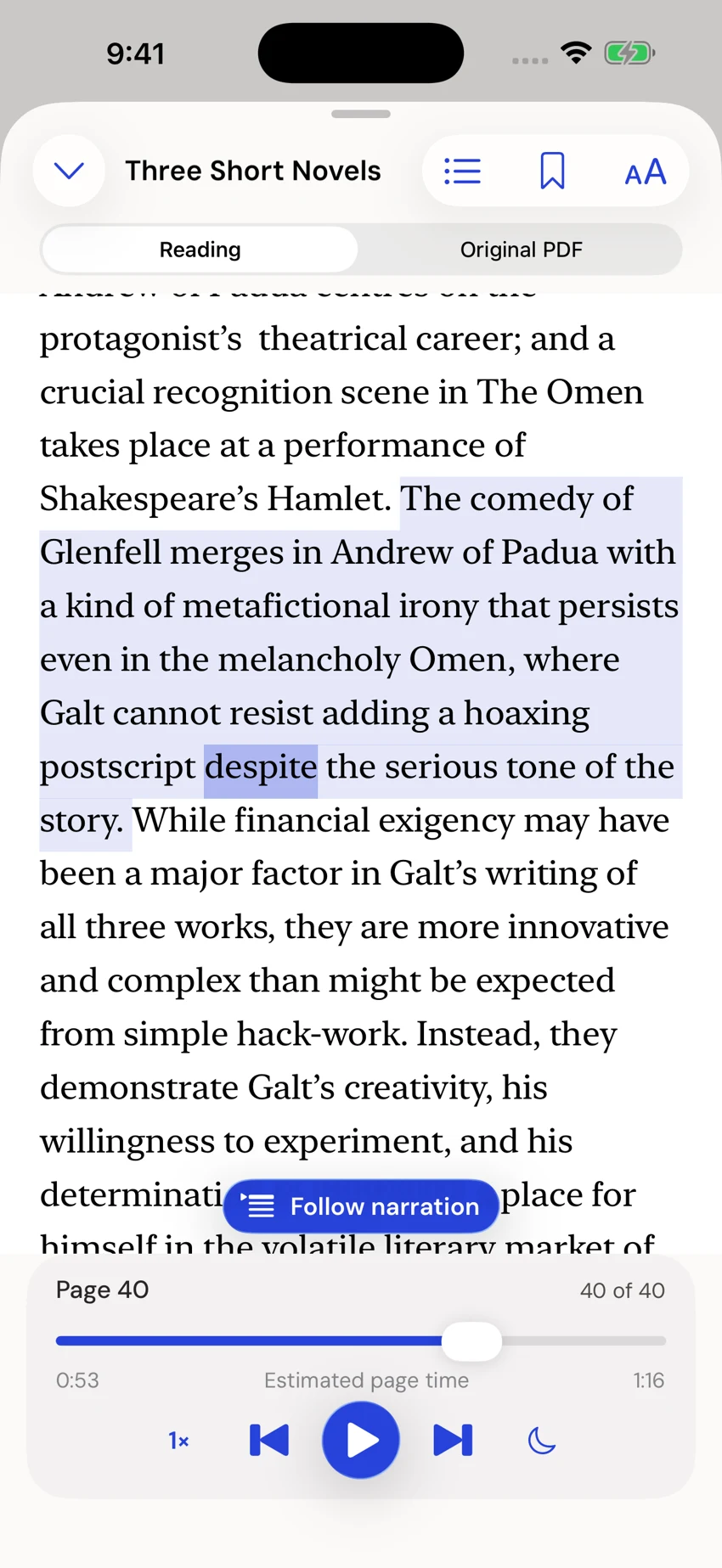
Earlo interface shown with sample content.
Before your first listen.
Start with an EPUB or PDF you can open on your iPhone or iPad. If the file is stored with a cloud provider, download it before you need offline access. Earlo reads files you import; it is not a subscription audiobook catalogue.
After importing, play a short passage and check the reading view. A scan may need OCR review, while a PDF with columns or complex tables may need you to consult its original pages.
Start with something you want to read.
Tap the import button on Home and choose a book or document from Files. Earlo accepts EPUB, PDF, DOCX, plain text, Markdown, HTML, and RTF. You can also paste a passage, save a webpage, scan a page, or choose photos.
Image and scanned-page imports use on-device English OCR. Review the recognized text, correct it, and reorder pages before saving. Your original source is retained. Webpage imports need a connection once; saved reading is available offline.
Find a voice you want to spend time with.
Open Settings to choose your narrator. Heart and Michael offer American English; Emma and George offer British English. Tap the separate preview control to hear a sample.
Once you are listening, choose a speed between 0.5× and 2×, adjust pitch, or set a sleep timer. These are your preferences: there is no right pace for a good story.
Read with your ears, your eyes, or both.
The reader highlights the spoken word and sentence. Tap a word to start from that point, or browse without losing your listening position. Follow narration brings you back to the active passage.
For PDFs, switch between the continuous reading view and your original pages. Adjust reading size, spacing, typeface, and appearance to suit you. Use chapter or page navigation when you want a wider view.
Keep the good parts.
Select a passage to add a note or bookmark, then find it again in Notes & Bookmarks. You can also prepare a selected passage and citation for an external AI app. You choose what to copy or share.
A pronunciation dictionary lets you teach Earlo a name or phrase, for one book or across your library. Narration exclusions let you skip a passage while keeping the visible source intact.
Make a little room, every day.
Group your reading into collections, then add whole books or documents to your listening queue. Search titles and saved text when you remember an idea but not where you found it.
Set daily reminders and see your reading streak and recorded listening activity. Use widgets, Siri, and Shortcuts for quick access, or control your iPhone from the Apple Watch companion. Optional iCloud sync can carry your library and saved places between your Apple devices.
Take a copy with you.
Export a book, chapter, selected passage, or page range as an MP3 with your chosen voice and settings. Exported audio is separate from your reading position. Your notes can leave as Markdown, too.